Warrant
Simple and effective punishments for Spigot and Paper servers. Warn, kick, mute and ban, permanently or for a set time, with a full history stored locally.
Requirements
- Latest release
- v1.0.0 · Oct 14, 2026
- Server
- Spigot / Paper 26.2+
- Java
- Java 25+
- Storage
- Local H2
- License
- GPL-3.0
What it does.
Warn, kick, mute, ban
Mutes and bans can be permanent or temporary, with /tempmute and /tempban.
Complete history
Every punishment is recorded, including revoked and expired ones, in a local H2 database.
Silent mode
Add -s to any command so only staff with warrant.notify see the announcement.
Offline targets
Punish players who are not online. Warnings are delivered the next time they join.
MiniMessage everywhere
Every message lives in a language file you can restyle without touching code.
Importers and API
Bring history over from Vanilla, LiteBans, AdvancedBan, LibertyBans and Essentials. Hook in with cancellable events.
What staff and players see.
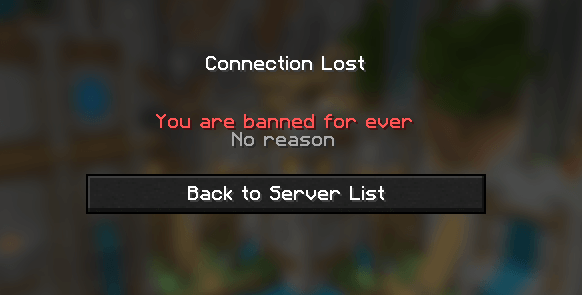
Banned players see the reason, how long is left, and the punishment ID to quote in an appeal.

/tempban Steve 7d Griefing spawn
Steve was banned by Alex for 7d: Griefing spawn
/warn Herobrine -s Please keep chat friendly
[S] Herobrine was warned by Alex: Please keep chat friendly
/unban Steve Appeal accepted
Steve was unbanned by Alex: Appeal accepted
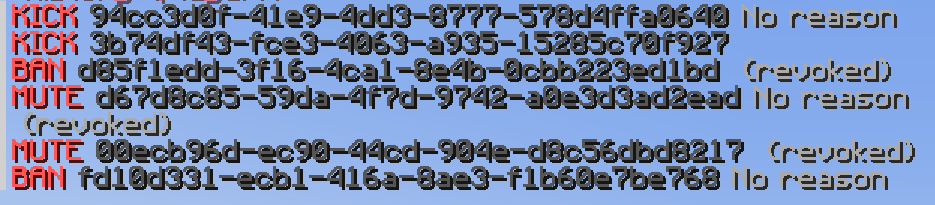
/punish history Steve
History for Steve (page 1/1)
BAN 2026-10-21T22:14:03Z by Alex for 7d (revoked, - left)
d85f1edd-3f16-4ca1-8e4b-0cbb223ed1bd Griefing spawn
Commands.
/warn <player> <reason>Warn a player/kick <player> [reason]Kick an online player/tempmute <player> <duration> [reason]Mute for a set time/tempban <player> <duration> [reason]Ban for a set time/unban <player> [reason]Lift an active ban/punish history <player>View a punishment history
Every command, permission and config option is in thedocumentation (opens in a new tab).
Install Warrant.
Download the jar from the releases page, drop it into your server's plugins folder, and start the server. Config and language files are created on first start.